Apple's PROLED MacBook Pro Dims With 240 Hz PWM: What Flicker Research Does and Does Not Show
Notebookcheck measured PWM dimming on the touch MacBook Pro's PROLED panel at 240 Hz with 56% amplitude, and some buyers report eye strain and headaches. We review how flicker frequency and modulation depth have been studied in relation to headaches, and where this measurement falls in that research.
Among display industry news from November 9 to 15, the item at the center of the technology side was reports of discomfort with the way the screen on Apple’s touch MacBook Pro is driven. This piece takes that coverage as a lead, separates confirmed figures from what is only reported, and goes on to the research evidence on flicker.
News the Press Covered, November 9 to 15
First, reports of discomfort with Apple’s touch MacBook Pro continued. On November 13, OLED-Info reported that some users complain of eye strain and dizziness and point to the screen’s 240 Hz PWM dimming, and in an article on November 10 AppleInsider reported eye strain and headaches among some new buyers. Apple’s official position has not been confirmed; this is covered in the body below.
Second, TCL CSOT showed OLED prototypes at DTC 2026, held on November 13 in Wuhan, China. According to OLED-Info, a 16-inch 2560×1440 inkjet-printed OLED laptop panel runs at 360 Hz, which CSOT said is the highest refresh rate among inkjet-printed laptop displays. The comparison is with a 300 Hz panel Samsung Display showed in August 2026. Three 10.95-inch tablet prototypes add one subpixel to the basic RGB layout; in the RGBB version, one of the two blue subpixels is a phosphorescent emitter, and CSOT said power consumption falls by 20% at the same brightness. For a 6.36-inch smartphone display using phosphor-sensitized fluorescence (PSF) for blue, CSOT said power is 30% lower than standard fluorescent blue at the same brightness. All of these figures come from the company, and the article contains no independent measurement.
Third, market forecasts and pricing reports came out. According to Counterpoint Research’s November 10 forecast, global smartphone OLED panel shipments in 2026 will fall to 829 million units from 894 million in 2025, while foldable and rollable OLEDs are expected to grow 23%. The decline calculated from the two shipment figures is 7.3%, and The Elec also wrote about 7%, but the title and lead of the OLED-Info article say “almost 3%”, which does not match these figures. In the same forecast, rigid OLED falls 24% and flexible OLED 3%. Separately, on November 13 OLED-Info, citing an analysis by market research firm Sigmaintell, reported that Samsung Display and LG Display plan to raise OLED monitor panel prices in 2027 and have also lowered shipment targets because of a surge in memory prices. The public part of the article contains neither the size of the increase nor official confirmation from the two companies.
Fourth, two OLED patent lawsuits were reported. According to OLED-Info on November 15, the US patent assertion company Prevalent Display sued Samsung Display and others in the US District Court for the Eastern District of Texas. The suit involves 4 US patents that Innolux filed in 2015 and 2016 and assigned to Prevalent in April 2026. Pictiva Displays sued BOE in the same court on November 4 over 5 US patents from OSRAM’s OLED patent portfolio. The Pictiva dispute with Samsung is a follow-up to a topic covered in Issue 9.
Fifth, there was technology news from Korean panel makers. According to The Elec, LG Display held its internal technology workshop “Tech X” from the 11th to the 13th, centered on its Paju site, and showed FLiPP, a patterning technology that does not use an FMM, internally for the first time. FLiPP was covered in Issues 2 and 10, so it is not reopened here. The Elec also reported that Samsung Display obtained 2 international cybersecurity certifications (ISO/SAE 21434, ENX VCS) for automotive OLED on November 10.
The lead issue for November 9 to 15 is PWM dimming and flicker on Apple’s PROLED MacBook Pro.
From November 5 to 13, reports continued that some buyers of the touch MacBook Pro (14 and 16 inch, tandem OLED “PROLED XDR”), which Apple began delivering to customers on November 6, report eye strain and headaches. This article separates what Apple has disclosed from the reported measurements, explains how LCDs and OLEDs dim the screen and what PWM dimming is, and then summarizes, with a focus on frequency, how flicker has been studied in relation to headaches.
The Specifications Apple Disclosed and the Reported Measurements
On Apple’s Korean and English specification pages, the entries for the built-in display are ProMotion variable refresh rate up to 120 Hz and a minimum brightness of 1 cd/m² (Apple writes nit). There is no wording on the dimming method, pulse-width modulation (PWM) or flicker. The October 28 announcement also states only that the display is a tandem OLED and that this is the first Mac to support touch. Apple’s official position on this coverage has not been confirmed.
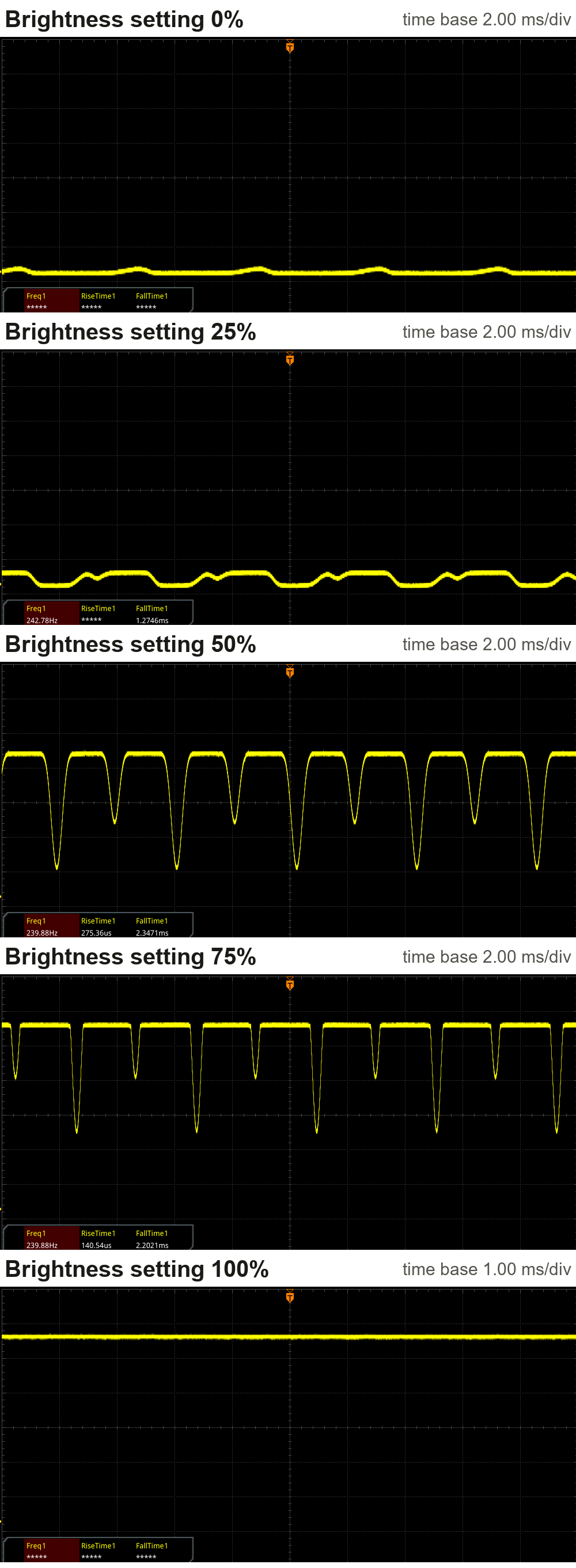
The measurements are in Notebookcheck’s November 5 review of the MacBook Pro 14 M5 Pro OLED. The device is 14.2 inches, 3092×1986 resolution (259 PPI), 120 Hz. Notebookcheck measured PWM at 240 Hz with an amplitude of 56%, wrote that it was detected at brightness settings of 99% and below, and that there is no PWM above that. The same review states that DC dimming is also observed at all brightness levels, while commenting that the low frequency could be a problem for sensitive users. The page does not state the measurement equipment or method.
In the same review Notebookcheck published oscilloscope screens for each brightness setting (RIGOL MSO5102, horizontal axis 2.00 ms/div, 1.00 ms/div for 100% only). At 100% brightness the signal is flat. At 25%, 50% and 75% the light does not switch fully off as in a simple square wave; instead, periodic dips from a high signal level repeat, and the frequency shown on screen (Freq1) is 242.78 Hz at 25% and 239.88 Hz at 50% and 75%. On the 50% and 75% screens, deep and shallow dips alternate. At minimum brightness (0%) only a small-amplitude ripple is visible and no frequency is shown. The vertical axis of the screens is the photodetector output voltage, and brightness values themselves cannot be read from these screens.
Two outlets report the discomfort. In its November 13 article OLED-Info wrote that complaints first arose on Reddit, that symptoms appear during long text reading, especially in dark mode, and that some users went back to the previous Mini-LED MacBook Pro. In its November 10 article AppleInsider stated that some new buyers develop eye strain and headaches, that complaints are being filed at the Genius Bar, and that retail return rates are slightly higher than usual. Neither article gave user counts or return numbers. The AppleInsider author said he is not a doctor, and attributing the cause to PWM is the author’s own judgment.
How a Screen Dims: LCD, OLED and PWM Dimming
The DISPLAY NOW video (5 minutes 44 seconds) covers everything from how screens dim to why flicker is thought to be linked to headaches. The article follows the same path in more detail, with sources.
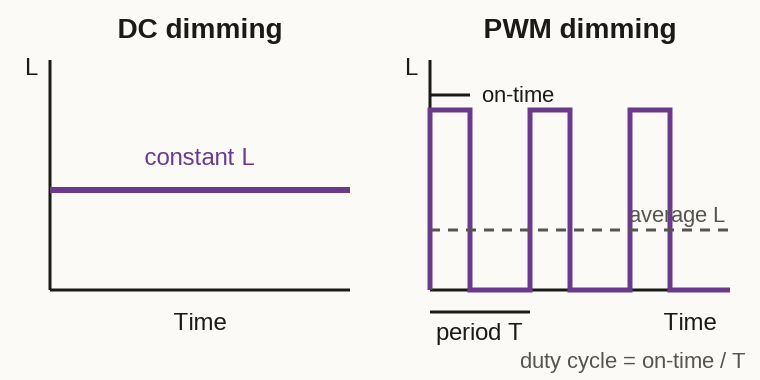
There are two main ways a display produces gray levels. One changes the magnitude of the current flowing through the light-emitting element; the other keeps the current constant and changes how long the element emits. The former is called pulse amplitude modulation (PAM) and the latter pulse width modulation (PWM). Dimming the whole screen can also be done in either way, and LCDs and OLEDs do it differently because their structures differ.
In a liquid crystal display (LCD), pixel gray level and overall screen brightness are set by different components. Gray level is set by the amount of light the pixel’s liquid crystal transmits, and overall brightness by the brightness of the backlight behind it. So to dim the screen, the backlight brightness is changed. Some products control backlight brightness with PWM; the 2024 Mini-LED MacBook Pro 14 that Notebookcheck measured, with a PWM frequency of 14,880 Hz, is an example.
An OLED is self-emissive and cannot change the brightness of the whole screen with a single backlight as an LCD does, so brightness is changed through the voltage applied to the pixels. Each pixel’s gray level is set by the data voltage (gamma voltage) written to the gate of the driving TFT; this voltage sets the current through the OLED, and the current sets the brightness. The SID 2025 P-61 poster calls this DC dimming or gamma dimming and explains that because the current is constant over the frame, light output does not vary over time.
As a general driving principle, changing the brightness of the whole screen this way requires a separate gamma set, defining the voltages for gray levels 0 to 255, for each brightness step. These sets are stored in the driver IC’s memory, and when the user changes brightness, the set for that step is loaded and applied to the pixel data. When brightness is set very low, the voltage difference between adjacent gray levels becomes small, so small pixel-to-pixel variations readily show up as luminance nonuniformity (mura). This paragraph and the LCD paragraph above summarize driving principles common in the industry and are not statements from a paper this article read directly. Published patents include examples that describe storing gamma curves per brightness step in the driver IC as prior art, and examples describing a structure that keeps the backlight at maximum and controls brightness through pixel gray levels, but these were confirmed only from search result summaries; the originals were not read.
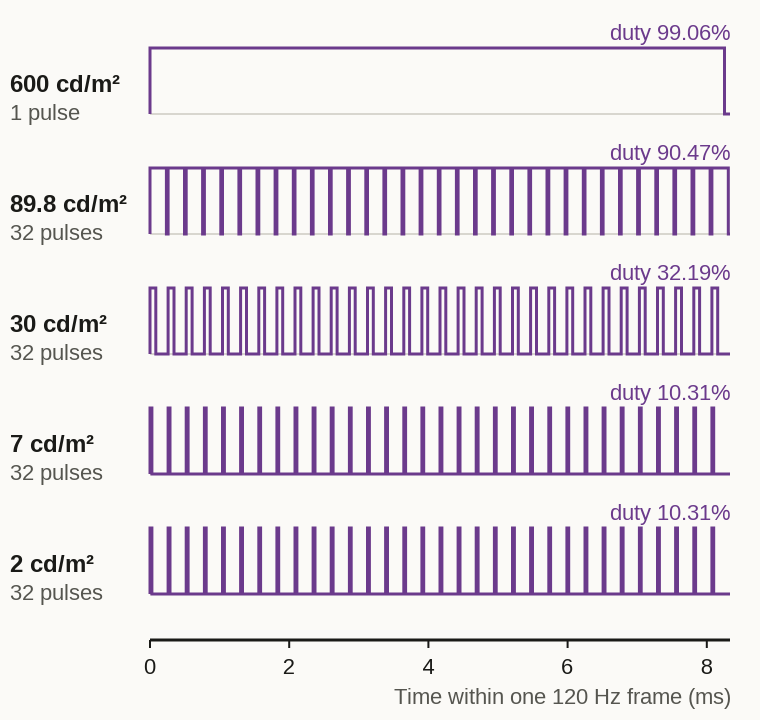
PWM dimming lowers brightness by shortening the time the light is on rather than reducing its intensity. One on-off cycle is called a pulse; the pulse width is the on time, and the number of pulses per second is the PWM frequency (Hz). The SID 2025 P-61 poster states that the longer the OLED is on, the longer the total emission time and the brighter it is, and the longer it is off, the darker. In OLED panels this is implemented with the emission control (EM) signal, and Table 2 of the poster shows an example that sets the number of EM pulses per frame and the EM duty for each brightness band. In the hybrid dimming example, 600 cd/m² uses 1 pulse at 99.06% duty, and from 89.8 cd/m² onward 32 pulses are used with duty falling to 90.47%, 32.19% and 10.31%. In this table, the brightness band of the screen appears to be set by pulse count and duty, and the gray level of each pixel within the band by the gate voltage of the driving TFT, but the poster does not define this division of roles in a single sentence.
In microLEDs, PWM is the method for producing gray levels at the pixel level. The ETRI and Hanyang University paper in the SID 2025 Digest states that the external quantum efficiency (EQE) and wavelength of microLEDs vary with current density, making PAM hard to apply, so the authors studied a PWM pixel circuit that holds the current constant and controls brightness with pulse width. The same paper divides PWM into two types. Analog PWM sets the emission time by comparing a ramp signal with an analog data voltage, while digital PWM divides one frame into binary-weighted subframes and produces gray levels by combinations of on and off (item 3 in the figure). The digital method requires faster operation and more power because data must be rewritten for every subframe. The Samsung Electronics and Sungkyunkwan University paper in the SID 2025 Digest also states that microLED pixel circuits use PWM because PAM can distort image quality through wavelength shift.
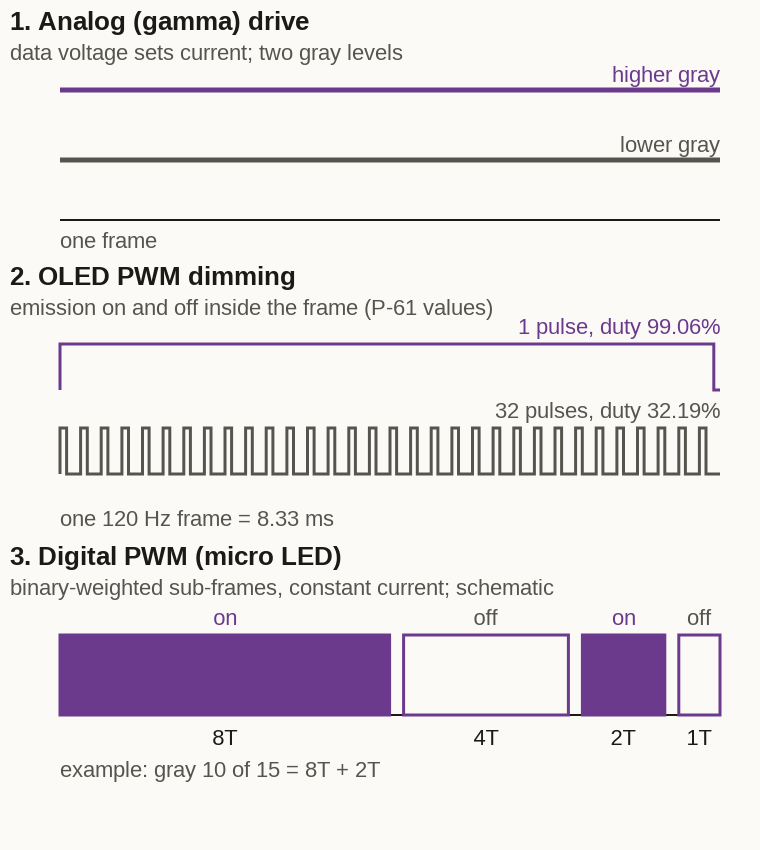
PWM dimming in OLED panels and PWM gray levels in microLEDs use the same word but apply to different things. The former interrupts emission within the frame to lower the average brightness of the whole screen or of a brightness band, while pixel gray levels are produced separately by current magnitude. The latter produces the pixel gray level itself through emission time. Subfield driving in DLP and LCOS is not covered because the originals could not be read within the scope of this article.
We found no material explaining why deep and shallow dips alternate on Notebookcheck’s measurement screens. This article does not judge whether the pattern comes from the panel’s driving scheme or from the measurement method.
Why OLEDs Use PWM Dimming at Low Luminance
A poster in the SID 2025 Digest (P-61) by researchers at Yungu, a Visionox affiliate, explains that current OLED panels usually use hybrid dimming. The high-luminance range uses DC dimming to reduce power, and the low-luminance range uses PWM dimming to secure screen uniformity. The reason given is that driving TFT consistency is poor at low luminance and low gray levels, which produces mura, and that inserting off periods into the emission control signal shifts the TFT’s operating range to avoid this.
According to the same poster, driver ICs initially supported only 2 or 4 pulses and came to support 16, 32 and 64, and 120 Hz×32 corresponds to 3,840 Hz. Using DC dimming down to low luminance (full DC) reduces power by 50 to 80 mW, but the emission duty rises to 99%, increasing leakage current in the driving TFT and lowering uniformity at low gray levels and low luminance. The authors claim they achieved PWM-level mura under full DC through voltage settings and a compensation algorithm. Because this is a poster by manufacturer-side researchers, the material cannot tell us whether this method is used in the MacBook Pro panel.
A 2019 explainer from Notebookcheck gives a different reason: lowering the supply voltage of an AMOLED can change color along with brightness. There are two explanations, and the two sources alone cannot settle which dominates.
The Physical Quantities of Flicker Are Frequency, Modulation Depth and Duty Cycle
Flicker is the variation of light output over time (temporal light modulation). The speed of the variation is expressed as frequency (Hz) and its size as modulation depth. The IEEE 1789 family of documents and Kim (2021), which cites it, express modulation depth as percent flicker, given by 100×(Lmax−Lmin)/(Lmax+Lmin), where Lmax and Lmin are the maximum and minimum measured luminance. In PWM, the duty cycle, the fraction of one period during which light is emitted, sets the brightness, and the lower the duty cycle, the longer the off time.
Notebookcheck labels the amplitude it measured on the MacBook Pro as “Amplitude(%)”. In this article Notebookcheck’s amplitude, the modulation depth used in research and percent flicker all refer to the size of the variation, but whether their definitions are the same is not confirmed on the relevant page. The MacBook Pro’s 56% is the amplitude Notebookcheck measured, and there is no basis for treating it as the same value as the modulation depth used in the studies below.
Flicker Perception and Headache Reports by Frequency
What is known by frequency is summarized below. The evidence for every row is explained in the body that follows.
| Frequency band | What is known | Source |
|---|---|---|
| Below about 80 Hz | Brightness differences observed as flicker | Veitch & Miller (2024) |
| 1.6 to 30 Hz | Discomfort scores proportional to visual cortex response amplitude, peak about 9 to 19 Hz | Patterson Gentile & Aguirre (2020) |
| 100 and 120 Hz (magnetic-ballast fluorescent lighting) | Reported association with headaches and eye strain, pronounced in headache-prone people | Wilkins et al. (1989), as presented by Veitch & Miller (2024) |
| 200 to 800 Hz and above | Flicker artifacts perceived in modulation with a spatial edge, median disappears above 500 Hz | Davis et al. (2015) |
| Below 1,200 Hz | Phantom array from a 100% modulation rectangular wave visible to all detectors | Miller et al. (2024) |
| 1,250 Hz and above | IEEE 1789 low-risk frequency level (as cited in Kim 2021) | IEEE 1789-2015 |
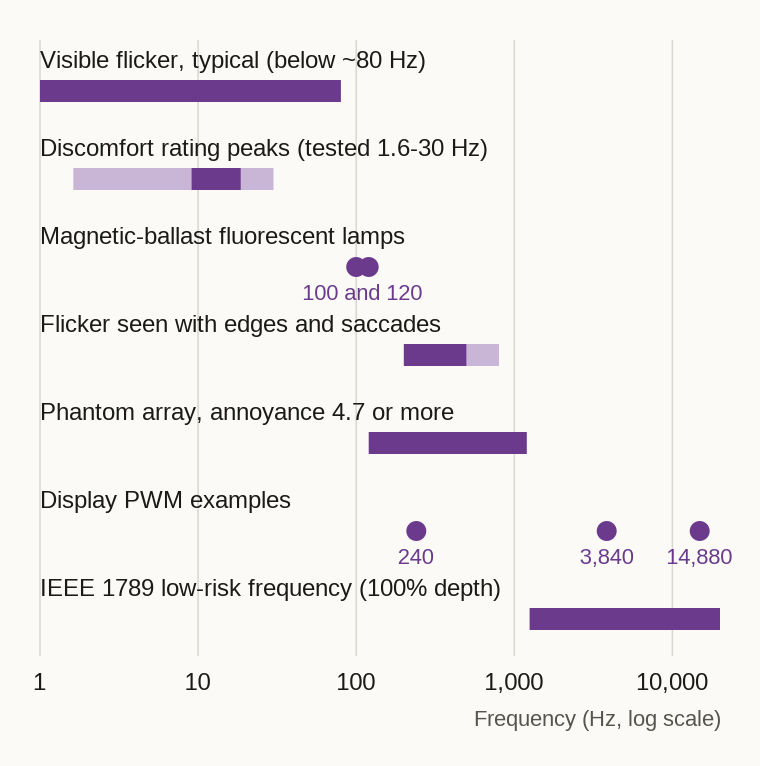
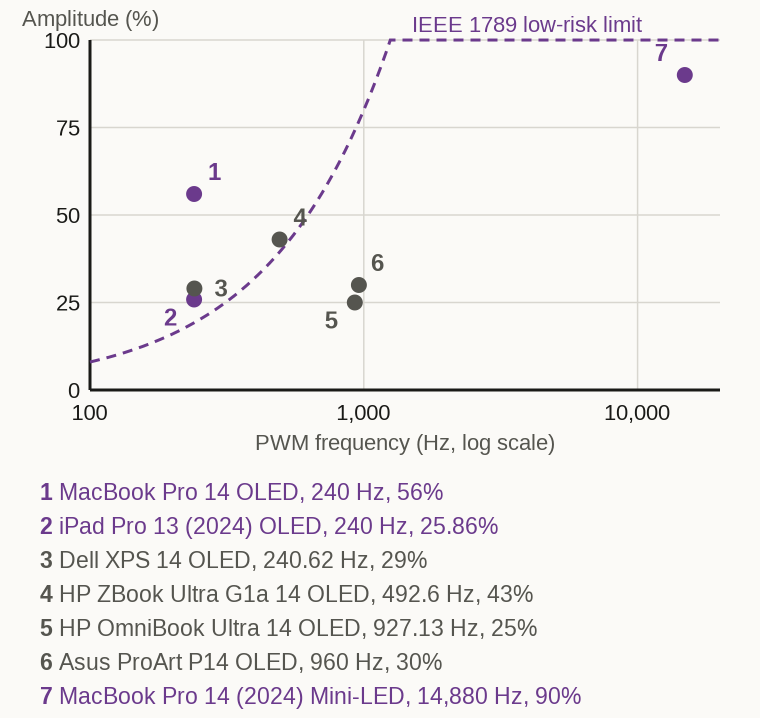
IEEE 1789-2015 is a recommended practice for mitigating health risks from LED lighting. The low-risk limit for modulation depth is 0.08×frequency (%), the no-effect level is 0.0333×frequency (%), and 5% or less is recommended at 90 Hz and below (as cited in Kim 2021). By this formula the low-risk limit at 240 Hz is 19.2%. The 56% amplitude Notebookcheck measured on the MacBook Pro is larger than that. However, it has not been confirmed whether Notebookcheck’s amplitude and percent flicker share a definition or whether the measurement conditions (distance, luminance) are the same. In addition, this standard is for lighting and is currently in “Inactive-Reserved” status (changed on March 26, 2026), and Veitch & Miller (2024) state that it is contested because harmless conventional light sources fall into the high-risk region and because it does not account for waveform and duty.
Why Is Flicker Thought to Be Linked to Headaches?
Laid out in order, the research evidence running from flicker to headaches looks like this, and the strength of evidence differs at each link.
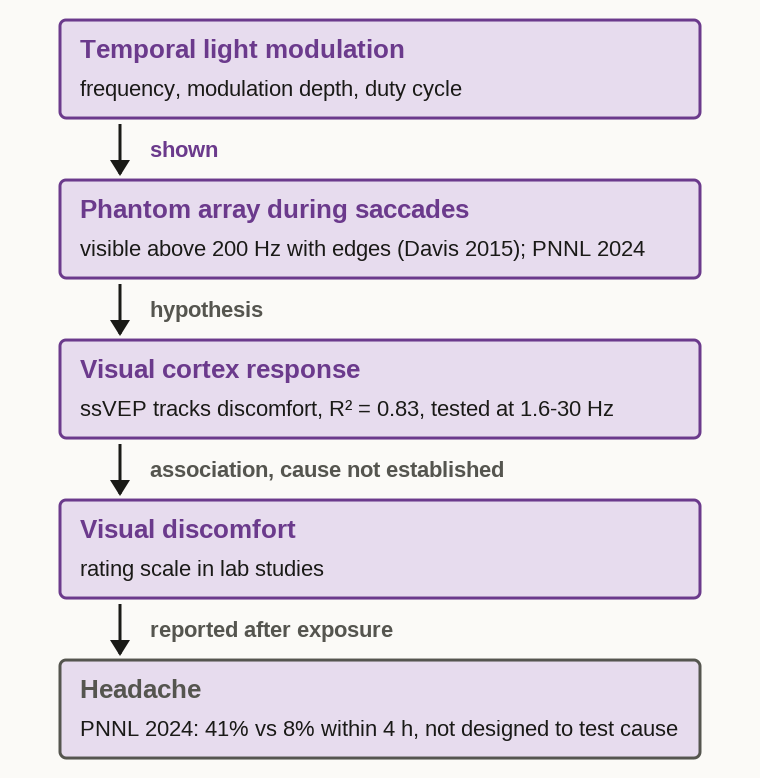
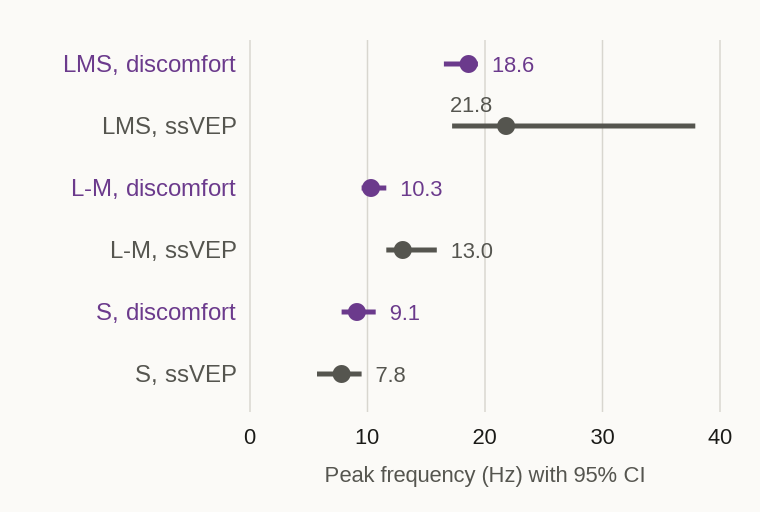
The most direct neurophysiological data come from Patterson Gentile and Aguirre (2020, Journal of Vision). They flickered a uniform field 50° in diameter at 1.625 to 30 Hz at high contrast for 10 migraine patients and 10 headache-free people, and recorded discomfort scores together with the amplitude of the steady-state visually evoked potential (ssVEP) in early visual cortex. The two values were linearly related across 14 conditions (R²=0.83), and the discomfort peak was 18.6 Hz in the luminance (LMS) pathway, 10.3 Hz in the red-green (L-M) pathway and 9.1 Hz in the blue-yellow (S) pathway. No difference in neural response was found between the migraine and control groups, and the authors wrote that the small sample could detect only large differences.
This result supports the visual stress theory, which holds that discomfort is related to overactivation of the visual cortex. The authors do not assert causation, and state that the melanopsin ganglion cell pathway is too slow relative to flicker speed to fit the explanation. As for why larger responses are more uncomfortable, they offer the interpretation that the stimuli deviate from the statistics of natural environments. The flicker in this experiment was 30 Hz or below, 240 Hz was not tested, and what was measured was discomfort ratings, not headaches.
Why Is High-Frequency Modulation Visible?
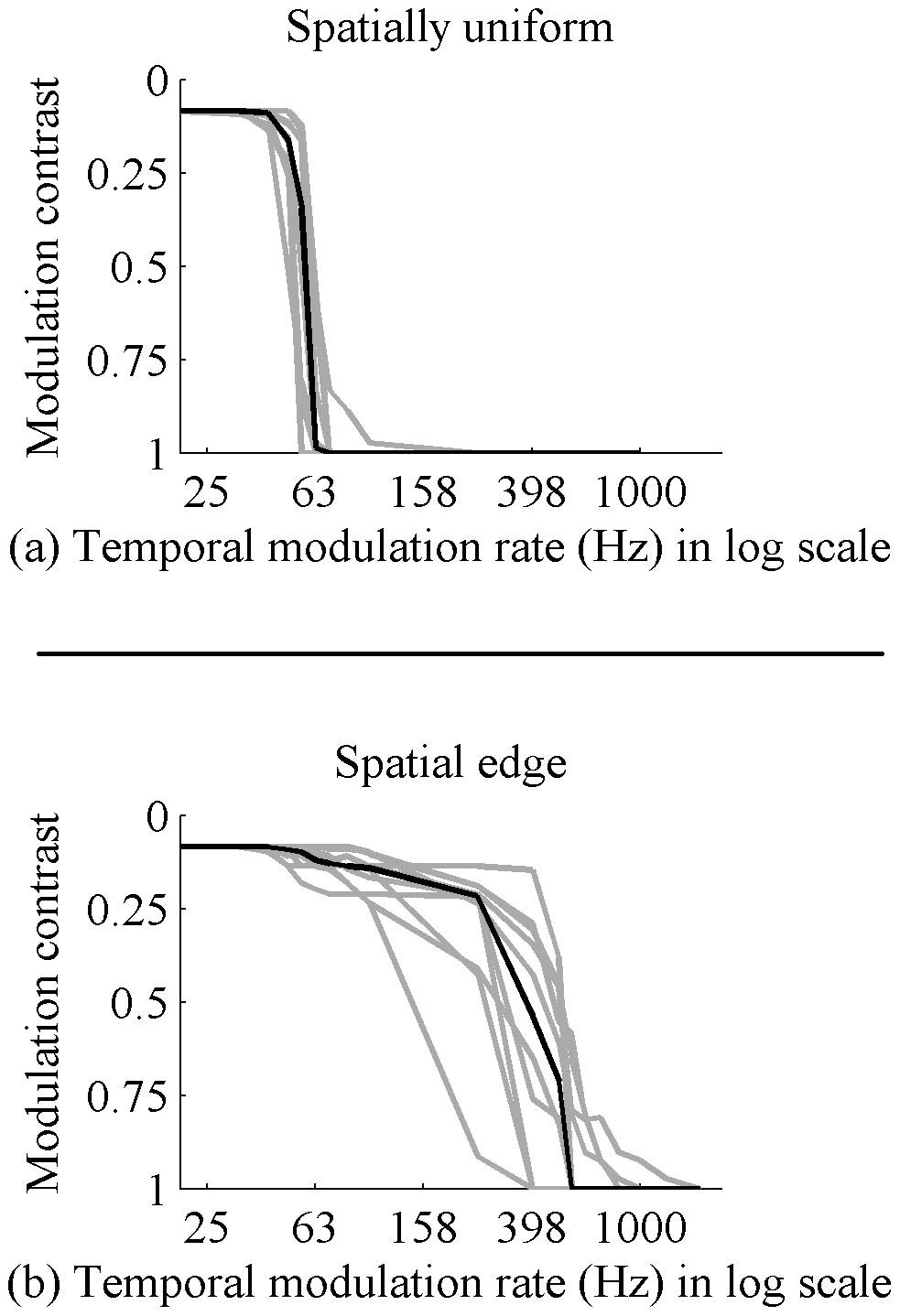
The conventional figure for the critical flicker fusion frequency is 50 to 90 Hz. Davis et al. (2015, Scientific Reports) showed modulated light from a DLP projector to 10 people aged 20 to 29 and reported that on a uniform field sensitivity reached zero at about 65 Hz, but with a spatial edge everyone reported flicker artifacts above 200 Hz and some saw them even above 800 Hz. The median disappeared only above 500 Hz. The authors hypothesized that rapid eye movements across the edge (saccades) are the cause.
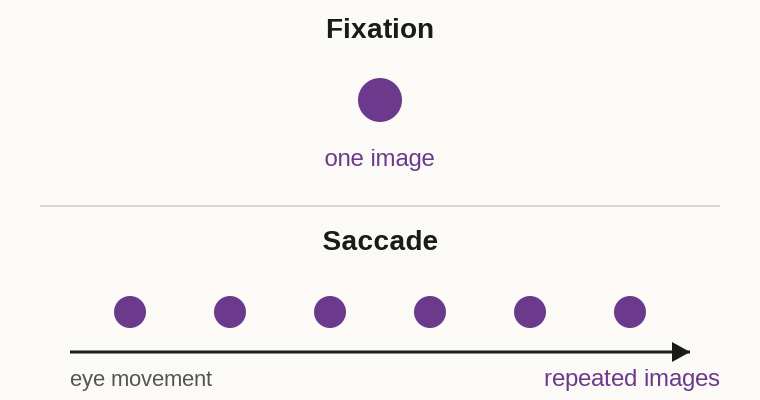
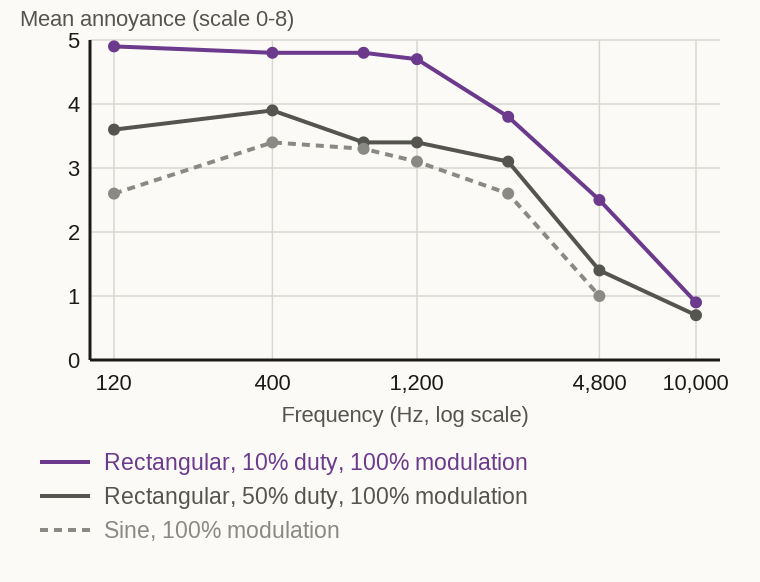
The phenomenon in which a flickering light source appears as a spatial pattern during a saccade is called the phantom array effect. Miller et al. (2024, Lighting Research & Technology) showed 85 waveforms from an LED on a black background to 55 people (25 with migraine) and rated visibility and annoyance. A 100% modulation rectangular wave below 1,200 Hz was visible to all participants who reliably detected the phantom array, with mean annoyance above 4 on a 0 to 8 scale. Visibility was higher in the migraine group (p=0.019), which was relatively more sensitive at high frequencies (p<0.001).
Table 1 of the same paper gives mean annoyance by frequency. For a rectangular wave with 10% duty and 100% modulation, it was 4.9 at 120 Hz, 4.8 at 400 Hz and 800 Hz and 4.7 at 1,200 Hz, falling to 3.8 at 2,400 Hz, 2.5 at 4,800 Hz and 0.9 at 10,000 Hz. The share of participants who saw this waveform was 89 to 93% up to 1,200 Hz, 85% at 2,400 Hz, 73% at 4,800 Hz and 16% at 10,000 Hz. A 100% modulation sine wave had lower annoyance at the same frequencies: 2.6 (120 Hz), 3.4 (400 Hz), 3.1 (1,200 Hz), 2.6 (2,400 Hz) and 1.0 (4,800 Hz). This means PWM-like waveforms with sharp on and off transitions were more annoying than sine waves at the same frequency, and annoyance fell from about 1,200 Hz onward. These values were obtained under conditions that evaluate the phantom array with large saccades.
Headache Evidence From Lighting Research and Its Limits
In fluorescent lighting research, the association between flicker and headaches is generally credited as first systematically reported by Wilkins et al. (1989). We could not check the original paper; according to the account in Veitch & Miller (2024), temporal light modulation from magnetic-ballast lighting (120 Hz in North America, 100 Hz in most countries) was associated with headaches and eye strain, and the reduction under high-frequency ballasts was measured only in people prone to headaches. The same paper presents Küller and Laike (1998), who found no effect of ballast type on brain activity across the whole sample (50 people), but found that people with a high critical flicker fusion frequency showed a marked attenuation of EEG alpha activity under magnetic ballasts.
The results are not consistent. Zhao et al. (2020) tested 10 people under 9 conditions of 100, 400 and 1,500 Hz and modulation depths of 10, 30 and 70%, and reported that occipital alpha activity was lower at 100 Hz than at 1,500 Hz (increased arousal), but fatigue was predicted by modulation depth rather than frequency, and the results did not always match the order of the IEEE risk regions. Sekulovski et al. (2020) compared modulation of 12.5% and 36.4% (both 100 Hz) over several months in an office with windows and found no significant difference in self-reported health. Veitch & Miller state that it is not known whether visual perception metrics predict health outcomes such as headache incidence.
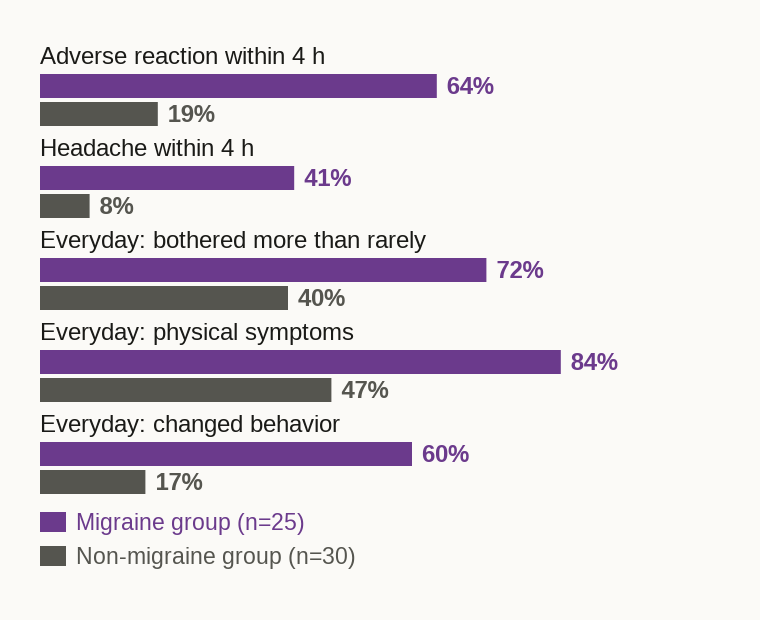
In the experiment by Miller et al. (2024), 64% of the migraine group reported discomfort or adverse reactions within 4 h after the experiment, compared with 19% of the non-migraine group. For headaches the figures were 41% vs 8%. The paper wrote that the experiment was not designed to distinguish which stimuli cause symptoms and that further research is needed on whether visibility is necessary for symptoms, and stated that all participants were informed in advance that symptoms might occur. The conditions, an LED at 52,400 cd/m² against a black background with large saccades, differ from a laptop screen. Migraine and flicker are also connected in Karanovic et al. (2011): when 14 migraine patients and 14 controls viewed 10 Hz flicker, discomfort scores were significantly higher in the migraine group.
Display Measurements: Viewing Distance and Amplitude
The paper that measured smartphone OLED PWM from the standpoint of effects on the human body is by Samsung Display engineer Minhyuk Kim (2021). Measuring a 240 Hz PWM smartphone with a photodetector and oscilloscope, it reported that against the IEEE criteria, percent flicker exceeds the criteria at a distance of 1 cm and low luminance, and that the 240 Hz component is visible up to about 4 cm but indistinguishable from ambient noise at 5 cm and beyond. Citing literature giving an average smartphone viewing distance of 33.95 cm, it concluded that the effect in ordinary use is small, and wrote that other devices such as TVs need further study. This conclusion concerns smartphones; laptop screens were not measured, and the fact that the author works for the panel maker in question should be taken into account.
DXOMARK measures smartphones with a flickermeter (Westar TRD-200), states that OLED PWM is about 50 to 500 Hz and LCD about 1,000 Hz or more, and lists the Galaxy S20 Ultra at 241 Hz, the Galaxy Note20 Ultra at 240 Hz, the Huawei P40 Pro at 362 Hz and the OnePlus 8 Pro at 481 Hz. In the comparison table in Notebookcheck’s same MacBook Pro review, 240 Hz is not unique to the MacBook Pro.
| Device | Panel | PWM frequency (Hz) | Amplitude (%) |
|---|---|---|---|
| MacBook Pro 14 M5 Pro | OLED (tandem) | 240 | 56 |
| iPad Pro 13 (2024) | OLED (tandem) | 240 | 25.86 |
| Dell XPS 14 | OLED (LG) | 240.62 | 29 |
| HP ZBook Ultra G1a 14 | OLED (Samsung) | 492.6 | 43 |
| HP OmniBook Ultra 14 | OLED (Samsung) | 927.13 | 25 |
| Asus ProArt P14 | OLED | 960 | 30 |
| MacBook Pro 14 2024 M4 Pro | Mini-LED | 14,880 | 90 |
Amplitude differs even at the same 240 Hz. The MacBook Pro’s 56% is larger than the 25.86% of the iPad Pro 13 (2024). The Mini-LED MacBook Pro has a high frequency of 14,880 Hz, but its amplitude of 90% is the largest in the table. Comparing frequency alone hides this difference.
Earlier Measurements in the Same Product Family and Apple’s Measures
For the iPad Pro 13 (2024, tandem OLED), Notebookcheck measured PWM at 240 Hz with an amplitude of 25.86% in July 2024 and commented that sensitive users may experience eye strain. The iPhone 12 Pro, in Notebookcheck’s November 2020 measurement, was irregular: 223 to 250 Hz from minimum brightness to about 21%, 60 Hz at 22 to 50%, and 80 to 277.8 Hz above 50%. The same article concluded that some discomfort may remain.
In September 2025 Apple added “Display Pulse Smoothing” to the iPhone 17 lineup. MacRumors reported that it was found in the iOS 26 release candidate and rendered Apple’s description as, in substance, “disables PWM and dims the OLED differently” and “may affect low-brightness performance under certain conditions”. Notebookcheck’s measurements found that the feature works only at 25% brightness and below and that the dimming frequency does not change, and it assessed that it seems to offer little help to sensitive users. AppleInsider states that the setting exists on iPad mini and iPhone but not yet on macOS.
Among Apple’s patents, we identified US 9,953,581, US 11,257,426 and US 10,424,244 as dealing with PWM of the emission signal or flicker in OLED displays. For all three, only the Google Patents abstracts were read, not the claims. US 9,953,581 (Apple, filed 2016, “PWM driving scheme and bezel reduction”) describes a circuit that drives the emission signal with PWM line by line, with a structure that sets the timing and duty of the emission signal using the clock signals of a gate-in-panel (GIP) driver and programmable clocks. US 11,257,426 (Apple) is a structure that reduces flicker arising when the pixel refresh period becomes long in low refresh rate OLED pixels (6T1C), and the abstract states that it can be used together with PWM dimming of the emission signal. US 10,424,244 (Apple, filed 2017, “Display flicker reduction systems and methods”) describes a method that reduces flicker by adjusting the PWM emission period of an OLED frame by frame. Whether these patents relate to the MacBook Pro’s 240 Hz PWM cannot be determined from the abstracts alone, and we found no public material showing that Apple applied them to this product. A patent shows that a structure exists, not how a product is driven. We also found no official material on Apple’s panel supplier or on the PWM driving scheme (pulse count, duty, hybrid transition range).
The Record of Discomfort Reports on User Forums
The representative forum record for the new MacBook Pro is the MacRumors Forums thread “RIP MacBook Pro PROLED for PWM Sensitive Eyes”. On November 5 the author posted a summary of the Notebookcheck review figures (240 Hz, amplitude 56%, brightness 99% and below), asked whether anyone had used it, and wrote that he would look at one in a store the next day. As of November 14 the thread was 12 pages long, and a poll asking “Does this display cause you eye strain or discomfort?” had 120 responses, with 41 “yes” (34.2%) and 79 “no” (65.8%). The author asked that only people who had used this laptop respond, but whether respondents are actual users cannot be verified, and because the sample is self-selected it cannot be read as the share of users experiencing discomfort.
Forum records about flicker discomfort predate this product. The MacRumors Forums thread “Eye strain while using iPhone X and up” began on November 6, 2017, and was 548 pages long as of November 14. The first post describes eyes straining to focus when looking at the screen and blurring when looking elsewhere, and does not name PWM as the cause. Both threads are user self-reports and show neither the cause nor the frequency of the symptoms.
What We Looked For and Could Not Find
- The number of users reporting discomfort, and the number and rate of returns
- The original Reddit thread that OLED-Info identified as the first source of complaints (we could not open it)
- Apple’s official position on this coverage, and Apple’s official documentation of Display Pulse Smoothing
- Notebookcheck’s PWM measurement equipment and method
- Material giving the MacBook Pro’s PWM duty cycle and waveforms by brightness in numbers
- A study that directly measured whether display PWM at the level of 240 Hz and 56% modulation causes headaches. The studies cited here are lighting experiments, low-frequency (30 Hz and below) discomfort ratings and smartphone distance measurements, each different, and connecting them is a hypothesis.
Outlook
We place the discomfort reports around the touch MacBook Pro’s PWM dimming in the same category as the PWM at the same frequency already measured on the iPad Pro (2024). What is new is that the amplitude, at 56%, is larger than on the iPad Pro, and that because the device is a laptop, the screen area viewed and the viewing time are greater than on a smartphone. The only direct evidence available for this judgment is the Notebookcheck measurement and comparison table, and the studies above do not establish a causal link to headaches.
To tell whether this judgment is right, watch three things. First, whether independent measurements other than Notebookcheck’s confirm the PWM frequency, amplitude and duty cycle. Second, whether Apple adds Display Pulse Smoothing or an equivalent feature to macOS, and if it does, whether it is limited to brightness of 25% and below as on the iPhone 17. Third, whether counts of discomfort reports or return statistics are published. If any one of these is confirmed, the judgment in this article has to be revised.